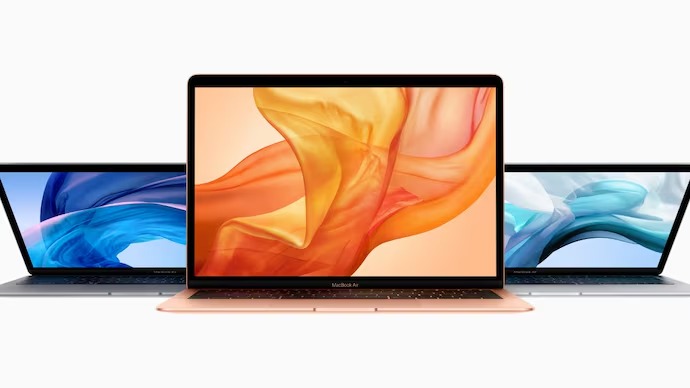
Apple has officially moved three older MacBook models into its obsolete product category, marking an important change for people still using these machines. The affected devices include the 2018 Retina MacBook Air, the 13-inch 2018 MacBook Pro with four Thunderbolt 3 ports, and the 13-inch 2017 MacBook Pro with two Thunderbolt 3 ports.
The announcement does not mean these laptops will suddenly stop working. Owners can continue using their machines normally as long as the hardware remains functional and the installed software continues supporting their requirements. However, the biggest concern begins when the device develops a major hardware fault requiring replacement components.
Three MacBooks Reach Obsolete Status
The latest classification affects three Intel-based MacBook models that have already spent several years outside Apple’s mainstream product lineup. The 2018 Retina MacBook Air is among the most notable devices because it represented a major design change for Apple’s lightweight notebook range.
The other two machines are 13-inch MacBook Pro models from 2017 and 2018. The 2017 version came with Intel’s Kaby Lake processors, while the 2018 model introduced several updates, including True Tone display support and Apple’s third-generation butterfly keyboard.
Apple generally separates older products into different support categories. Products typically become vintage after around five years from when distribution ends, while the obsolete classification generally arrives after seven years. The three MacBooks have now crossed that longer support threshold.
What Obsolete Actually Means
The word “obsolete” can sound more serious than it actually is for existing owners. It does not remotely function like a remote shutdown command, and Apple is not disabling these computers through software because of the new classification.
A working MacBook Air 2018 can still be switched on, connected to the internet, used for documents, browsing, media consumption, and other supported everyday tasks. The same applies to the affected MacBook Pro models.
The major difference involves Apple’s hardware service network. Once a product becomes officially obsolete, Apple Stores and authorised service providers generally cannot order replacement parts for regular hardware repairs. This can make repairing an older machine significantly more difficult.
That distinction matters because many people assume an obsolete product becomes completely unusable. In reality, the classification is mainly about Apple’s ability and policy to provide official hardware service rather than an immediate end to functionality.
Why Repairing Them Gets Harder
For an older MacBook, hardware failure can become a bigger problem than software compatibility. Components such as logic boards, display assemblies, internal connectors and other specialised parts can be difficult to source once official replacement channels disappear.
Before reaching obsolete status, vintage products may still receive repairs when Apple or authorised partners have the required components available. After the obsolete designation, regular hardware support becomes substantially more restricted.
This means an owner facing a serious hardware failure may need to investigate independent repair specialists. Third-party technicians could potentially repair some problems using available components, refurbished parts, or compatible replacement hardware.
However, third-party repair availability can vary considerably depending on the exact component and the condition of the laptop. A repair that looks straightforward could become expensive if the required part is rare or difficult to source.
Battery Support Has One Exception
There is one useful exception that older MacBook owners should understand before making any immediate buying decision. Apple’s battery service policy can extend beyond the normal obsolete hardware support period for Mac laptops.
According to the current information, battery-only repairs may remain possible for up to ten years after the product was last distributed for sale, subject to parts availability. That means owners of these 2017 and 2018 MacBook models could still potentially obtain battery service even after the products enter the obsolete category.
This does not guarantee that every battery replacement request will be fulfilled. Availability of the necessary battery and the service provider’s ability to complete the work remain important factors.
Still, this exception gives some breathing room to people whose main concern is battery health rather than a major internal component failure.
The 2018 MacBook Air Was Important
The MacBook Air 2018 was more than just another yearly refresh for Apple’s laptop lineup. It introduced a significant redesign that brought the Air closer to Apple’s modern notebook design language.
It was the first MacBook Air generation to feature a Retina display and Touch ID. The machine also arrived with slimmer bezels and a thinner, lighter design compared with earlier Air models.
Those changes helped make the model attractive to students, professionals and everyday users looking for a relatively compact Apple laptop.
Even though its hardware is now considerably older, the design remains familiar to many Mac users. That explains why some owners may still prefer keeping their existing machine rather than immediately replacing it.
MacBook Pro Models Also Matter
The two affected MacBook Pro models belong to a different stage of Apple’s laptop history. They were among the Intel-powered MacBooks that eventually gave way to Apple’s transition toward its own Apple silicon processors.
The 2017 13-inch MacBook Pro used Intel’s Kaby Lake platform, while the 2018 model added hardware and display improvements. The newer model also used Apple’s third-generation butterfly keyboard, a design that became one of the more discussed aspects of this generation.
For people who purchased these laptops as professional machines, the obsolete classification may therefore be more relevant than it first appears. A computer used for basic tasks can potentially continue for years, but professional users often depend on reliable hardware service when something breaks.
Should You Replace Your MacBook Now?
Not necessarily, especially if the laptop remains stable and performs everything you currently need. Replacing a computer purely because Apple has added it to an obsolete list may not make financial sense for every owner.
The decision becomes more important if your machine is already showing signs of ageing. Frequent overheating, poor battery performance, keyboard problems, display issues, charging failures, or unexpected shutdowns could indicate that continued ownership may become increasingly difficult.
Software requirements should also be considered. Older Intel Macs are naturally further behind Apple’s current hardware generation, and future software compatibility can become another reason to eventually upgrade.
For someone using an older MacBook mainly for web browsing, writing, emails, video calls and basic productivity, the existing device may remain perfectly useful for some time.
What Existing Owners Should Do
The first practical step is simple: do not panic. An obsolete label does not automatically make the laptop unsafe, unusable, or worthless.
Owners should instead create reliable backups of important documents, photographs and other personal data. This becomes particularly important with an ageing computer because hardware failure can happen without much warning.
It is also sensible to check the current battery condition and monitor unusual behaviour. If the laptop is working properly, continuing to use it while maintaining regular backups can be a reasonable approach.
For owners already experiencing hardware problems, getting a professional diagnosis sooner rather than later could also make sense. Repair options may be easier to find while compatible parts remain available through independent sources.
A Sign Of Apple’s Hardware Shift
Apple’s latest obsolete classifications also highlight how quickly computer hardware generations move forward. The affected MacBooks belong to the Intel era, while Apple’s current Mac lineup is built around its own silicon architecture.
The transition has changed expectations around performance, efficiency and long-term software support. Older Intel Macs can still perform useful tasks, but they increasingly sit outside Apple’s newest hardware ecosystem.
For existing owners, this does not create an emergency. It simply means that future repairs and upgrades require more planning than before.
Final Verdict For MacBook Owners
Apple’s decision to classify these three older MacBooks as obsolete is mainly a warning about hardware support, not an immediate end to their usefulness. The 2018 Retina MacBook Air and the affected MacBook Pro models can continue working normally when their hardware and software remain capable.
The real concern arrives when a major component fails and official replacement parts are no longer readily available. Battery service may still remain possible under Apple’s extended battery policy, depending on parts availability, while serious repairs could increasingly require independent technicians.
For now, owners should focus on backups, battery condition, software needs and overall reliability before deciding whether an upgrade is necessary. If the machine still handles everyday work comfortably, there is no need to replace it simply because its status has changed. However, users who depend heavily on their Mac for professional work should begin planning a replacement before an unexpected hardware failure turns into a much bigger problem.
Read More :- thenumberinfo.com